
History: PlayStation leaves the living room
PSP launched in Japan on 12 December 2004, followed by North America in March 2005 and Europe in September 2005. Sony’s approach centred on bringing substantial 3D games and entertainment to a portable screen. The result was a different proposition from the Nintendo DS: one widescreen display and an analogue control rather than two screens and a stylus. Sony reported 70 million PSP systems sold worldwide by April 2011, illustrating the scale of the platform before the Vita era.
Screen, controls and media
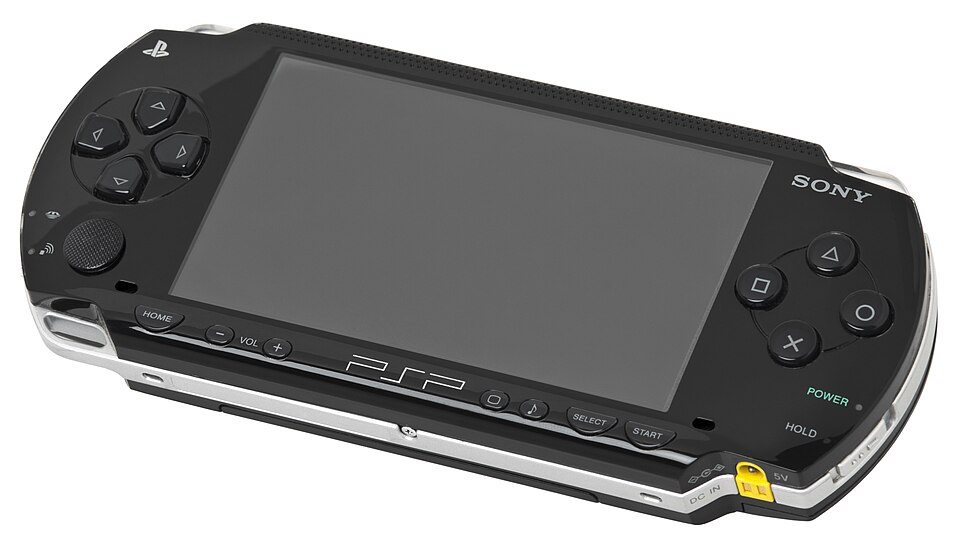
The original PSP specification combines a 4.3-inch, 480 × 272 widescreen display with a MIPS-based processor running up to 333 MHz. Its directional pad, four face buttons, shoulder buttons and single analogue nub give it a recognisable PlayStation layout. UMD is Sony’s small optical-disc format, with up to 1.8 GB capacity. A Memory Stick Duo slot supports storage. The distinction matters in practice: a game disc and a save file are different things, so check that a used system also includes usable storage.
Which PSP model?
The PSP-1000 is the original design. The PSP-2000 Slim & Lite made the system thinner and lighter and introduced video output. Later revisions include the PSP-3000 and the budget Street family. PSP go takes a more radical route: sliding controls and downloadable games instead of a UMD drive. Do not buy a go for a physical UMD collection. Compare the exact model’s ports, storage, wireless features and charger before buying; the PSP name alone does not guarantee identical capabilities.
Games to explore
The library stretches from action adventures and racing to role-playing and rhythm games. These editorial starting points show different sides of the handheld. Check whether the game you want is available on UMD or was a digital release, and whether its language suits you. A PlayStation series name does not mean the PSP version is identical to its home-console counterpart. Portable entries often have their own campaigns, controls and structure, which makes them worth documenting as separate games.
God of War: Chains of Olympus
An action-focused introduction to portable PlayStation.
Open my collection ↗UMD, downloads and the Vita
A UMD-based PSP and a PSP go need different buying strategies: the former accepts physical discs, while the go depends on digital software. A PS Vita is a separate successor and has no UMD drive; owning a PSP disc does not make it usable in a Vita. When evaluating a used console, do not assume installed downloads come with transferable ownership. Record physical games, storage media and account-dependent purchases separately, and verify compatibility before paying for accessories or software.
Online services today
Sony’s service notice says the PSP storefront closed in 2016 and remaining searches and in-game purchases ended on 6 July 2021. Its notice distinguishes these purchases from downloading previously purchased content; consult the current support page before relying on an old account or download. Individual games also have their own server histories. Local ad-hoc multiplayer, where supported by both game and hardware, is distinct from internet matchmaking. An old box’s online logo is not proof that its original online service still works.
Checking a used PSP
Our practical checklist starts with the screen, analogue control, buttons, speakers and headphone socket. On a UMD model, test an actual game through loading and play, not just the menu. Check the disc casing and battery compartment, and ask about replacement shells or batteries. Include a compatible charger and storage in your budget. For your collection, record the model number, colour, included accessories and repair history. Compare like-for-like completed sales rather than assuming a limited colour automatically makes a console valuable.
Care and preservation
Keep UMDs in their protective casing and store games dry and out of heat. Do not force a disc mechanism or poke at its lens. Back up personal save files before replacing storage or resetting a system. Stop using a swollen battery and arrange a suitable replacement. Homebrew and emulation are separate subjects from official support: check the exact hardware and project documentation before modifying anything. A careful inventory of your own software, saves and hardware is a useful first preservation step.
Sources and editorial notes
An independent guide with manufacturer references. Buying choices and inspection checklists are editorial guidance. Services can change; consult current support notices.